Friday, 27 September 2013
Thursday, 26 September 2013
Secret Windows 7 themes!!!
Hi guys, I am Aditya Banerjee (on the blog as Hack Duke or HD).
I got something interesting for Windows 7 users. Discovered this after I made hidden files visible and a little poking in C drive.
Microsoft has secret themes/wallpapers from places around the world. And they are, as I said, hidden.
So, first of all, Go to the Windows installation directory (usually the /C: drive.). Then go to the "Windows" folder. Here, a folder named Globalization should be present. Double click on it. There will be probably 2 folders, named "ELS" and "Sorting".
Ok, so what now? Well, now click on the address bar. It will change to C:\Windows\Globalization. Now add a "\" and type in "MCT" (without spaces). The full path should be something like this "C:\Windows\Globalization\MCT". Voila!! Some folders!! Open them (one by one). For eg. MCT-AU will give you three folders. All these folders will have a "theme" folder. Open it. You will see a Windows Theme File. Double click it. And now, enjoy these themes. They are also present in the "Customize" menu (which can be reached by right clicking on any point on the desktop).
Enjoy!!
HD
I got something interesting for Windows 7 users. Discovered this after I made hidden files visible and a little poking in C drive.
Microsoft has secret themes/wallpapers from places around the world. And they are, as I said, hidden.
So, first of all, Go to the Windows installation directory (usually the /C: drive.). Then go to the "Windows" folder. Here, a folder named Globalization should be present. Double click on it. There will be probably 2 folders, named "ELS" and "Sorting".
Ok, so what now? Well, now click on the address bar. It will change to C:\Windows\Globalization. Now add a "\" and type in "MCT" (without spaces). The full path should be something like this "C:\Windows\Globalization\MCT". Voila!! Some folders!! Open them (one by one). For eg. MCT-AU will give you three folders. All these folders will have a "theme" folder. Open it. You will see a Windows Theme File. Double click it. And now, enjoy these themes. They are also present in the "Customize" menu (which can be reached by right clicking on any point on the desktop).
Enjoy!!
HD
 |
| Here's the Image with Label |
Monday, 23 September 2013
How To Make your own android app for free !!
Hi friends,
 Today I will teach you how to create you own android app.....It a very easy process of just 1 hour or even less... The things that you will need are :-
Doesn't it sound interesting that making my own app and then dashing in you group about it........ but when you ask this question to a developer the method that he will tell you and explain will make you think that I am a mad person telling you that it is an easy process...... But well I will teach you there are two methods to make an android app......

- An Email Address (Gmail address preferred)
- An Internet Connection . That is obvious :) ;)
- And some time to read this post further.................
Doesn't it sound interesting that making my own app and then dashing in you group about it........ but when you ask this question to a developer the method that he will tell you and explain will make you think that I am a mad person telling you that it is an easy process...... But well I will teach you there are two methods to make an android app......
- Method by downloading Android SDK Files and Coding.
Well this method invovles all the shit work that only a computer geek like me :p can do. It involves steps like....
- Downloading the Android SDK . You can get it here. The Android SDK provides you the API libraries and developer tools necessary to build, test, and debug apps for Android.The SDK has following tolls in it :-
- Eclipse + ADT plugin
- Android SDK Tools
- Android Platform-tools
- The latest Android platform
- The latest Android system image for the emulator.
2.Unpack the ZIP file (named adt-bundle-<os_platform>.zip) and save it to an appropriate
location, such as a "Development" directory in your home directory.
3. Open the adt-bundle-<os_platform>/eclipse/ directory and launch eclipse.
That's it! The IDE is already loaded with the Android Developer Tools plugin and the SDK is ready to go. To start developing.
- Method that require only 1 - 1/2 hours for making app.

- First you need is log on to your Email account.
- Then type this in your browser http://www.appsgeyser.com/.
- Click on Creat Now Button.
- Select the type of app you want.
- Then Enter the required Fields of the app like Name , Description Etc.
- Then Click on create app.
- Fill int the form with correct information .... and deselect Suscribe me for the newsletter.
Done guyz now you android app is made. For any quires comment below.
adt-bundle-<os_platform>.zip) and save it to an appropriate adt-bundle-<os_platform>/eclipse/ directory and launch eclipse.- First you need is log on to your Email account.
- Then type this in your browser http://www.appsgeyser.com/.
- Click on Creat Now Button.
- Select the type of app you want.
- Then Enter the required Fields of the app like Name , Description Etc.
- Then Click on create app.
- Fill int the form with correct information .... and deselect Suscribe me for the newsletter.
Done guyz now you android app is made. For any quires comment below.
Sunday, 22 September 2013
Got Our New App Friends!!!
Hi,
Friends again we are back with a new application for our website...And a new height.....
This is a small and whole website based app no ads and shit things just free and small 267 KB . It has no other content instead of my website.
Well this app was not coded or made with android Software Development Kit. It was just made within one hour . Without any cramp.
For more information on how to make a android app for free without any coding and programming knowledge just view my post ....
ScreenShot:-


Friends again we are back with a new application for our website...And a new height.....
This is a small and whole website based app no ads and shit things just free and small 267 KB . It has no other content instead of my website.
Well this app was not coded or made with android Software Development Kit. It was just made within one hour . Without any cramp.
For more information on how to make a android app for free without any coding and programming knowledge just view my post ....
ScreenShot:-

Download Below:-
Thursday, 5 September 2013
Change Your Screen resolution without any headache :p !1
How To change your screen resolution without any headache :p !!
If you have an old processor like core2 duo, Pentium dual
core or an small screen monitor and want to install windows 7, vista or windows
8. And you are not getting a 1204 x 768 resolution and your computer always
gets automatically shut down when you change the resolution. So to prevent this
there are TWO METHODS :-
11) Find the drivers according to your processor and if you processor is to old like i3, core2 duo, Pentium dual core then for searching the driver you have crack your head and crawl around the internet for more that 5-6 hours and then also you cannot find it as Intel now don’t produce drivers for these processors and they only have drivers for windows xp or 7. So guyz……… for the next method to change the resolution follow me down.
2) The next method is very simple and not even complicated .The method goes like this :-
· First install windows 7 or windows8 or vista . Then open them up in low resolution mode for like 800 x 600 or lower .
· Then complete the steps like yourcomputer name and that all.
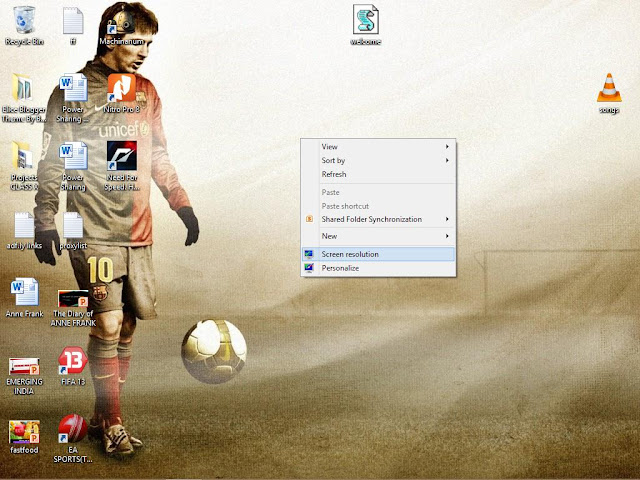
· Then right click on your desktop. And select Screen resolution.
· Now the screen resolution window will open up.
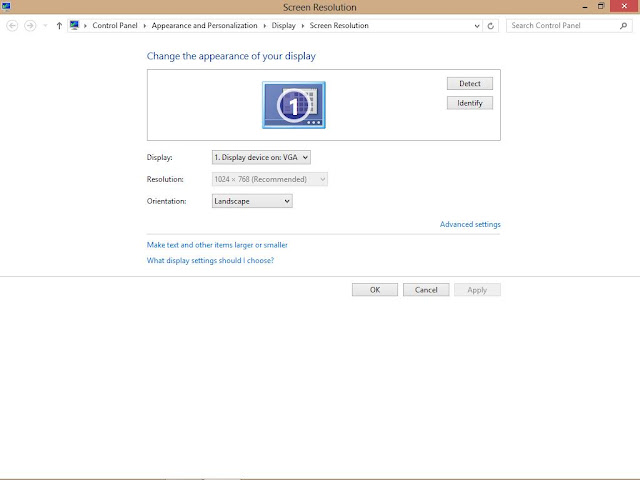
Click on Advance settings. Then a dialog box will popup .
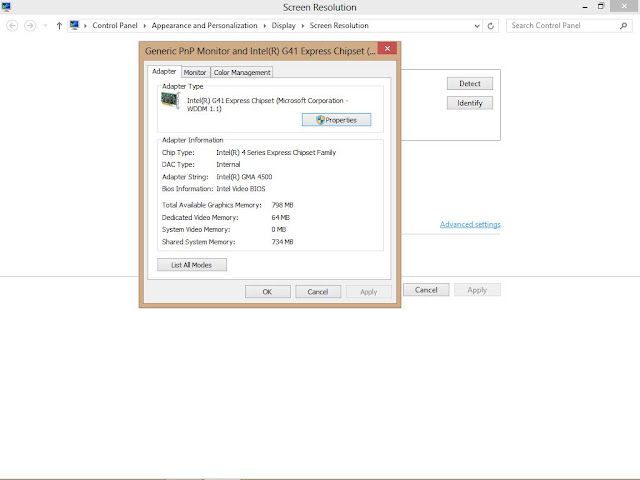
· Click on List all modules. And then select the resolution which you think your computer has handled in earlier OS or can handle. For my tips I always recommend you to choose 1024 x 768, True Color (32 bit), 60 Hertz. Then click OK. Then this window will close and then click on apply strictly saying click on Apply not on OK.
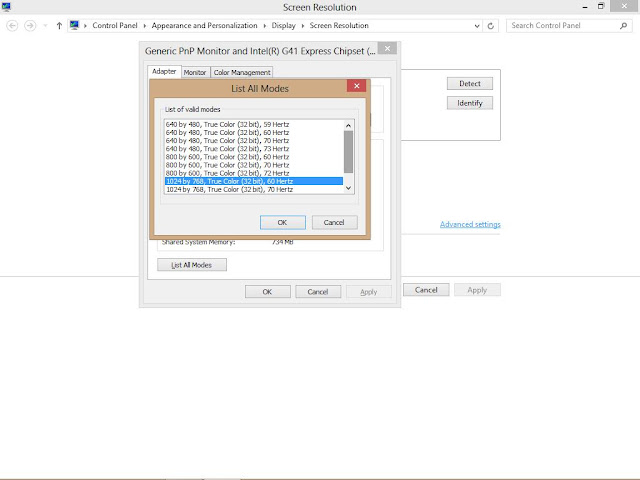
· Don’t worry if your screen goes blank when you choose some wrong one or try to choose some other resolution . It will come back to normal after means the resolution which you were workin 800 x 680 or else other after 15 seconds if you don’t restart or click or press any key.
For any quires please contact me or comment down. And please like my blog or post if it was helpful. Please subscribe to my blog also.
11) Find the drivers according to your processor and if you processor is to old like i3, core2 duo, Pentium dual core then for searching the driver you have crack your head and crawl around the internet for more that 5-6 hours and then also you cannot find it as Intel now don’t produce drivers for these processors and they only have drivers for windows xp or 7. So guyz……… for the next method to change the resolution follow me down.
2) The next method is very simple and not even complicated .The method goes like this :-
· First install windows 7 or windows8 or vista . Then open them up in low resolution mode for like 800 x 600 or lower .
· Then complete the steps like yourcomputer name and that all.
· Then right click on your desktop. And select Screen resolution.

· Now the screen resolution window will open up.

Click on Advance settings. Then a dialog box will popup .

· Click on List all modules. And then select the resolution which you think your computer has handled in earlier OS or can handle. For my tips I always recommend you to choose 1024 x 768, True Color (32 bit), 60 Hertz. Then click OK. Then this window will close and then click on apply strictly saying click on Apply not on OK.

· Don’t worry if your screen goes blank when you choose some wrong one or try to choose some other resolution . It will come back to normal after means the resolution which you were workin 800 x 680 or else other after 15 seconds if you don’t restart or click or press any key.
For any quires please contact me or comment down. And please like my blog or post if it was helpful. Please subscribe to my blog also.
Thursday, 29 August 2013
Interesting Facts About Abraham Lincoln !!!
 Abraham Lincoln is not only
one of the most loved presidents of the U.S.A , but also the
first one to have ever been murdered. A simple man at heart, he had a lot to
give to world in terms of virtue and morality, alongside his mainstream politics.
Here are some interesting facts about Abraham Lincoln :-
Abraham Lincoln is not only
one of the most loved presidents of the U.S.A , but also the
first one to have ever been murdered. A simple man at heart, he had a lot to
give to world in terms of virtue and morality, alongside his mainstream politics.
Here are some interesting facts about Abraham Lincoln :-1. Lincoln was the tallest President of USA. At six feet, four inches, Lincoln towered over most of his colleagues.
2. Before Abraham Lincoln, there had never been a U.S.A. President with a beard.
3. At the time of his marriage to Mary Todd Lincoln, Abraham Lincoln had been very poor. Mary Todd Lincoln's family did not approve of the match.
 |
| In His Younger Days !!! |
4. Lincoln loved animals and did not like hunting or killing them even for food. He had several pets including dogs, cats, and even a turkey.
5. Most people think of Abraham Lincoln wearing a tall stovepipe hat. He used to store things in his hat, including letters and other documents and also the important note !!!!
6. Mary Todd and Abraham Lincoln had four children. Three of their children died before reaching adulthood. Robert Lincoln was the only child to survive.
7. After his birth mother died of milk sickness, Lincoln's father remarried. As a boy, Lincoln was very close to his step-mother, and she was supportive of his need to educate himself.
8. Abraham Lincoln considered himself a Christian, but he did not belong to any church. He did not routinely say grace at mealtime, but he did read the Bible.
9. Abraham Lincoln was a witty man. Many of his jokes and funny sayings have been recorded.
10. Abraham Lincoln was the first president to be assassinated. He was killed on April 15, 1865 by John Wilkes Booth. At the time of his death, Lincoln was 56 years old.
11. Abraham Lincoln had a dream predicting his own death. In his dream, he heard crying in the White House. When he asked the person who had died, he was told that it was the President.
12. Lincoln suffered from serious depression and migraine headaches.
13. Lincoln could wrestle and was exceptionally skilled with an ax. But, he refrained from fishing and hunting because of his love for animals.
|
| Abraham Lincoln !! |
15. Edwin Booth, who had assassinated Abraham Lincoln, had actually saved the life of Robert, one of Abraham Lincoln's sons. Edwin had pulled Robert to safety when he fell into the space between an approaching train and the platform in 1864, in Jersey City.
16. Although Abraham Lincoln and his wife Mary Todd Lincoln produced four sons, there are no living descendants today. His last known succesor died in 1985.
17. Lincoln felt as the leader of the nation’s military, the president should be fighting in the Civil War but obviously couldn’t because of his duties.
18. Lincoln was the first and only president to ever obtain a patent.
19. Lincoln was the first president to be photographed at his inauguration. Standing close to Lincoln in the photo is his future assassin, John Wilkes Booth.
20. Not long before he was assassinated, Lincoln spoke of a dream where he heard someone weeping in the White House. When he found the room it was coming from, he asked who had died. He was told it was the president. He approached the coffin to peer in and saw his own face.


